Windows Agents · Optional AI support · Beta

AI that checks the device itself.

Describe the problem. The AI reads event logs, registry, services and drivers directly on the Windows device and proposes a fix. Part of Windows Agents, as an optional analysis tool with your own AI key: it works on Windows devices only, and every other fliix Ops function works without AI.
Read-only tools on the device Your own AI key with a monthly limit fliix Ops never sees the chat
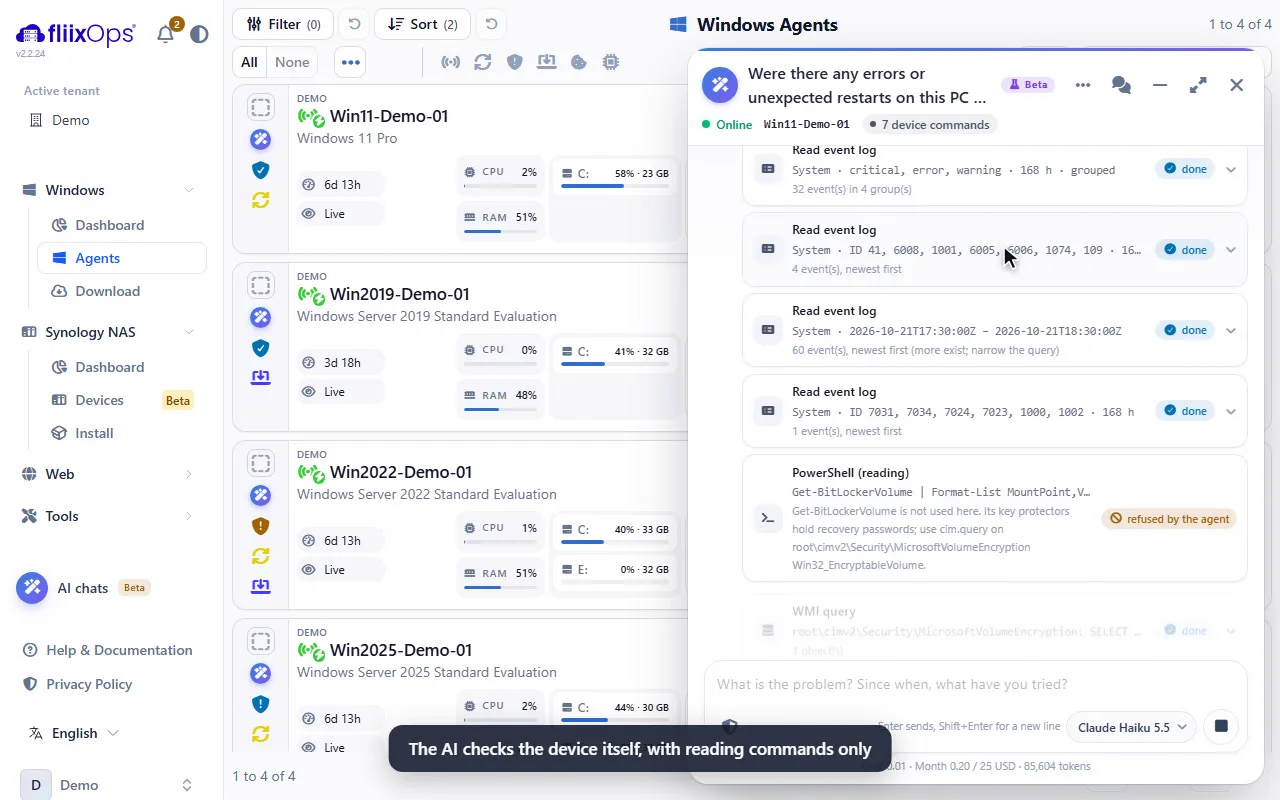
AI support chat on a Windows device in the fliix Ops console

Facts instead of guesses

The AI does not answer from memory alone. It looks at the device first and cites what it found.

Read-only by design

The tools only read. Changes stay with you and run through the regular console actions.

Your key, your costs

You bring your own AI key and set a monthly limit. Costs appear per chat and per month.

Private by default

Names are replaced before sending. fliix Ops sees neither your questions nor the answers.

In three steps

From a vague problem to a concrete fix

  1. Ask in plain words

    Open the chat on a device and describe the problem, or start from a security finding on that device.

  2. The AI checks the device

    It runs read-only commands on the device and shows each command with its result in the chat.

  3. You decide

    You get the likely cause and a proposed fix. You carry out the fix yourself with the console tools.

Capabilities

What the AI support can do today

AI support is part of the Windows Agents Full license and is in Beta. It works on online Windows devices with a current agent.

On the device

Looks where you would look

The AI uses the same sources a technician checks first.

  • Event logs on the device and the events the agent already reported.
  • Registry, services, drivers, installed software and updates.
  • Files, disk health, signed-in users and WMI/CIM queries.
  • Read-only PowerShell for anything the fixed tools do not cover.
  • Comparison with other devices in your tenant, for example “do others have the same driver?”.
Safety

Read-only with clear limits

Every step is visible and bounded.

  • Only read-only commands; nothing is changed on the device.
  • At most 24 commands per answer; each ends after two minutes.
  • Passwords, keys and tokens in results are masked before they reach the AI.
  • Every command and its result appear in the chat, so you can follow each step.
Your key

Bring your own AI provider

You choose the provider and model and keep control of costs.

  • Anthropic or OpenAI-compatible providers such as OpenAI, Azure OpenAI, Mistral or your own server.
  • Up to 10 keys with up to 20 models each.
  • Costs per chat and per month, with a monthly limit that stops the AI when reached.
  • Optional web search with a list of allowed domains (Anthropic models).
Privacy

Built for data protection

Hosted in Germany, with pseudonymisation and a complete log for your tenant.

  • User, device and domain names are replaced by placeholders before sending.
  • fliix Ops sees neither questions nor answers nor commands.
  • AI log per tenant with JSON export for access requests (Art. 15 GDPR).
  • Runs are deleted automatically after 90 days.
Control

Roles and limits per tenant

Decide who may use the AI and how much device data it may read.

  • A separate permission decides who may let the AI read devices.
  • Per tenant you choose whether the AI may use device data at all.
  • Up to 60 messages per tenant per day protect against runaway costs.
  • Web search stays off unless you allow it.
Findings

Starts where findings end

Security findings tell you what is wrong; the AI helps you find out why.

  • Start a chat from findings with a root cause, for example crashes or disk errors.
  • The AI reads the finding and checks the device for the cause.
  • Works alongside one-click fixes and push notifications for findings.

Requirements

What you need

AI support runs on managed Windows devices with the fliix Ops Agent. The AI provider is yours: fliix Ops does not resell AI usage.

Windows Full Active Windows Agents Full license on the device.
Own AI key Anthropic or an OpenAI-compatible provider.
Device online The AI reads live data from the device.
  • AI support is in Beta; answers can be wrong and should be checked before you act.
  • Your AI provider processes the pseudonymised content under its own terms.
  • Usage is limited by your monthly cost limit and the daily message limit.
  • Capabilities depend on Windows version, agent version and permissions.

FAQ

AI support with fliix Ops

Can the AI change anything on the device?
No. The AI only has read-only tools. It proposes a fix, and you carry it out yourself with the regular console actions, which are logged as usual.
Which AI providers are supported?
Anthropic and OpenAI-compatible providers, for example OpenAI, Azure OpenAI, Mistral or a model on your own server. You can store up to 10 keys with up to 20 models each.
What does it cost?
AI support is included in the Windows Agents Full license. Your AI provider bills its usage directly to you. fliix Ops shows the costs per chat and per month and stops at the monthly limit you set.
Who can read the chats?
Only users of your tenant with the matching permission. Names are replaced by placeholders before anything is sent to the AI provider. fliix Ops sees neither questions nor answers nor commands.
How long are chats and AI runs kept?
Every AI run is recorded in the AI log of your tenant and can be exported as JSON. Runs are deleted automatically after 90 days.
Why is it called Beta?
AI answers can be wrong, and the tools are still growing. Check every proposal before you act on it.

See it on a real device

Let the AI do the first round of checks.

We show the AI support on a demo device: from a vague problem to a concrete fix, with every command visible.